QuickBooks Plus Software Top Features and Ideal Users

Updated: Mar 1
In today's fast-paced business environment, managing finances effectively is key to success. QuickBooks has risen to the top as one of the best choices for accounting software. Among its various products, QuickBooks Plus shines with its powerful features and user-friendly design. This blog post will explore what QuickBooks Plus offers, showcase its best features, and identify who can benefit most from using it.
Understanding QuickBooks Plus
QuickBooks Plus is a cloud-based accounting software designed for small to medium-sized businesses. Its comprehensive tools help streamline financial processes, making it easier to track income, expenses, and overall financial health. With its straightforward design and powerful functionalities, QuickBooks Plus is an ideal choice for entrepreneurs and business owners seeking to simplify their financial management.

Key Features of QuickBooks Plus
1. User-Friendly Interface
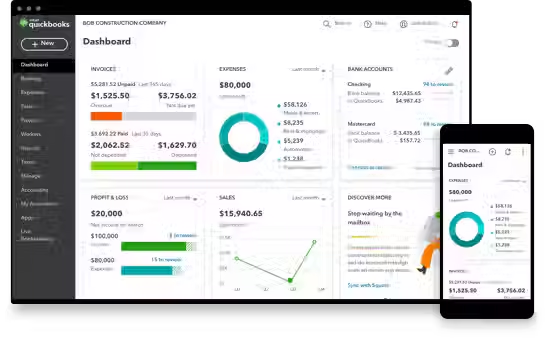
One of the standout features of QuickBooks Plus is its user-friendly interface. The clean layout and intuitive dashboard provide a clear overview of your financial status. For example, new users can learn to navigate the software within minutes, making it an excellent choice for those without extensive accounting backgrounds.
2. Invoicing and Billing
QuickBooks Plus enables users to create professional invoices quickly. You can customize each invoice with your logo, set specific payment terms, and automate recurring billing. A significant percentage of users (over 60%) reported saving time on invoicing thanks to these features, which helps maintain a professional image with clients.
3. Expense Tracking
Effective expense tracking is vital for businesses. QuickBooks Plus allows users to categorize expenses, upload receipts seamlessly, and monitor spending patterns. For instance, with the ability to generate reports, businesses can identify unnecessary expenses, leading to potential cost savings of up to 25%.
4. Financial Reporting
QuickBooks Plus provides diverse financial reports that deliver insights into business performance. From profit and loss statements to cash flow reports, users can make informed decisions based on real-time data. Customizable reports ensure businesses can focus on areas that matter most to them.
5. Multi-User Access
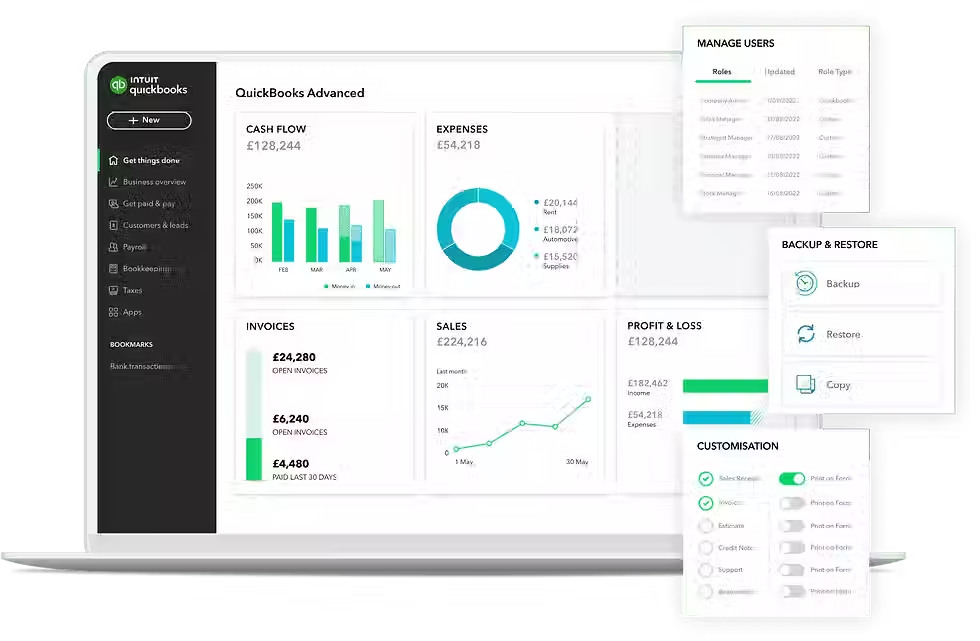
For businesses with several team members involved in financial tasks, QuickBooks Plus supports multi-user access. This means multiple users can work on the same account simultaneously, promoting collaboration. Businesses can also set user permissions, ensuring sensitive information remains secure.
6. Integration with Other Tools
QuickBooks Plus integrates seamlessly with various third-party applications, from payment processors to e-commerce platforms. This ability allows businesses to tailor an ecosystem that enhances productivity. Research shows that businesses using integrated tools achieve up to 30% better efficiency.
7. Mobile Access
Accessing financial data on the go is now essential. QuickBooks Plus offers a mobile app, enabling users to manage finances anytime, anywhere. Whether sending invoices or checking account balances, the app keeps you connected, which resonates well with today’s mobile workforce.
Who Can Benefit from QuickBooks Plus?
Small to Medium-Sized Businesses
QuickBooks Plus is an ideal solution for small to medium-sized businesses needing a robust accounting tool without the complications seen in larger enterprise software. In fact, about 80% of its users fall within this category, benefiting from features that cater to their specific financial management needs.
Freelancers and Independent Contractors
Freelancers and independent contractors stand to gain immensely from QuickBooks Plus. Its invoicing and expense tracking features empower individuals to manage their finances and invoice clients easily. Maintaining a professional image becomes effortless, which can boost client retention and referrals.
Startups
For startups looking to lay a solid financial foundation, QuickBooks Plus equips them to track expenses, manage cash flow, and generate custom reports. As their business grows, this flexible software scales to continue meeting their financial management needs, helping them stay organized during crucial early stages.
Non-Profit Organizations
Non-profit organizations often face unique financial management challenges. QuickBooks Plus assists these groups in tracking donations, managing grants effectively, and producing reports for stakeholders. Its user-friendly design means that staff without extensive accounting expertise can easily navigate the software.
Final Thoughts
QuickBooks Plus is a powerful accounting solution that offers a range of features designed to simplify financial management for small to medium-sized businesses, freelancers, startups, and non-profit organizations. Its user-friendly interface, robust invoicing capabilities, and comprehensive reporting tools make it an ideal choice for those looking to streamline their accounting processes.
Whether you are a business owner seeking better control over your finances or a freelancer wanting to project professionalism, QuickBooks Plus delivers the support you need. With its cloud-based platform and mobile access, managing your finances is easier than ever.
PROGRAM | Plus | |
PRICE: Retail | $115/mo Retail | |
PRICE: Wholesale (with 30% ProAdvisor Discount) | $80.50/mo | |
Intuit Assist | ||
Smart expense organization New | ✅ | |
Accounting Agent New | ✅ | |
Payments Agent New | ✅ | |
Customer Agent Beta | ✅ | |
Finance Agent New | ➖ | |
Project Management Agent Beta | ➖ | |
Accounting | ||
Expert Assisted Try bookkeeping help FREE for 30 days* | ✅ | |
Expert Tax File your business taxes with expert help | ✅ | |
Automated bookkeeping | ✅ | |
Tax deductions | ✅ | |
Automated bank feeds | ✅ | |
Accounting Agent New | ✅ | |
AI-enabled expert collaboration New | ✅ | |
Multiple currencies | ✅ | |
AI-powered reconciliation Beta | ✅ | |
Anomaly detection and resolution New | ✅ | |
Revenue recognition | ➖ | |
Auto-track fixed assets | ➖ | |
Expenses & Pay Bills | ||
5 free ACH bank transfers/mo for bills New | ✅ | |
Pay bills New | ✅ | |
Auto-match transactions New | ✅ | |
Auto-generated bills | ✅ | |
Receipt capture | ✅ | |
Bill management | ✅ | |
Mileage tracking | ✅ | |
Contractors | ✅ | |
Sales & Get Paid | ||
Auto-generated invoices and reminders | ✅ | |
Estimates | ✅ | |
Invoice and payments | ✅ | |
Connect sales channels | All available | |
Sales and sales tax | Automated | |
Payments Agent New | ✅ | |
Recurring invoices | ✅ | |
Lending | ||
Business checking with 3.00% APY | ✅ | |
Lending marketplace | ✅ | |
Access capital | ✅ | |
Customer Hub | ||
Customer management New | ✅ | |
Notes and tasks management New | ✅ | |
Reputation management New | ✅ | |
Appointment scheduling Beta | ✅ | |
Customer Agent Beta | ✅ | |
Lead management New | ✅ | |
Contract upload and e-signature New | ✅ | |
Time | ||
Enter time | ✅ | |
Project Management | ||
Project profitability | ✅ | |
Job costing | ✅ | |
Project Management Agent Beta | ➖ | |
Inventory | ||
Inventory Tracking | ✅ | |
Purchase orders | ✅ | |
Sales orders | ✅ | |
Shipping labels | ✅ | |
Business Intelligence | ||
Cash flow planning | ✅ | |
Budgeting | ✅ | |
AI-powered profit & loss insights Beta | ✅ | |
AI-powered balance sheet insights Beta | ✅ | |
Finance Agent New | ➖ | |
Forecasting | ➖ | |
Custom report builder | ➖ | |
Data sync with Excel | ➖ | |
KPI scorecard Beta | ➖ | |
Connected Platform | ||
Users | 5 | |
Automatic business feed New | ✅ | |
Mobile app | ✅ | |
Integrate with hundreds of apps | ✅ | |
Reports | Comprehensive | |
User management and permissions | Basic | |
Custom Fields | 4 | |
Class and location tracking | Up to 40 | |
Workflow automation | ➖ | |
Batch invoices and expenses | ➖ | |
Backup and restore | ➖ | |
Support and training | ➖ |
To read more about our QuickBooks Online requirements in our different packages, and to see all features in the different levels, click here to learn more.

Comments