Practice Protect: Secure Password Management and IT Protection for Professional Firms
- A Bigger Bottom Line, LLC

- Jan 23
- 3 min read
Every business owner knows the frustration of juggling dozens of passwords for different accounts, software, and services. Forgetting a password or using weak ones can lead to costly security breaches or lost productivity. For entrepreneurs and small business owners, managing passwords securely while saving time is a constant challenge. This is where Practice Protect steps in as a reliable password vault and IT protection tool designed to simplify your digital security.
What Practice Protect Does and How It Works

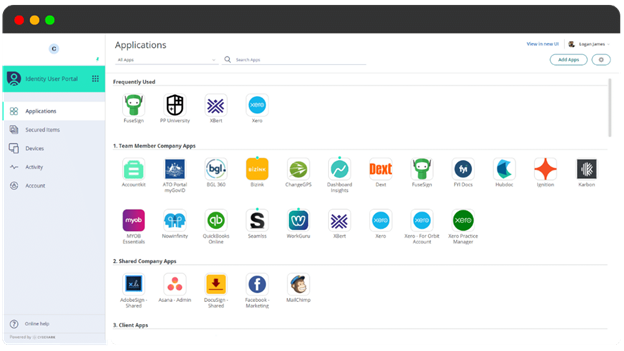
Practice Protect is a cloud-based password management and IT security platform tailored for professional firms and small businesses. It acts as a centralized vault where you can store, organize, and access all your passwords safely. Beyond just a password keeper, it offers multi-factor authentication, device management, and threat detection features to protect your business from cyber risks.
The software encrypts your passwords and sensitive data, ensuring only authorized users can access them. You log in once with a master password and, if enabled, a second authentication factor like a mobile app code or hardware token. From there, you can autofill passwords on websites and apps, generate strong new passwords, and share credentials securely with team members without exposing the actual passwords.
Practice Protect also integrates with your existing IT systems, providing a layer of protection that monitors for suspicious activity and helps you control access to critical business applications.
Practical Ways Small Businesses Use Practice Protect
1. Secure Client Account Access
Many small businesses handle multiple client accounts across various platforms. Practice Protect lets you store all client login details in one place, accessible only to authorized staff. This reduces the risk of lost or shared passwords via insecure methods like email or sticky notes.
2. Simplify Team Password Sharing
When you have a growing team, sharing passwords can become a security nightmare. Practice Protect allows you to share credentials securely without revealing the actual password. Team members can log in to necessary tools without knowing the password itself, reducing the risk of leaks.
3. Manage Remote Work Security
With remote work becoming common, controlling access to company systems is critical. Practice Protect’s device management and multi-factor authentication ensure that only trusted devices and users can access sensitive information, protecting your business from unauthorized access.
4. Automate Password Updates
Regularly updating passwords is a best practice but often neglected due to time constraints. Practice Protect can generate strong passwords and remind you when it’s time to update them, helping maintain strong security hygiene effortlessly.
Key Benefits of Practice Protect
Centralized Password Storage
All your passwords and sensitive data are stored securely in one place, reducing the risk of loss or theft.
Enhanced Security with Multi-Factor Authentication
Adds an extra layer of protection beyond just passwords, making unauthorized access much harder.
Secure Team Collaboration
Share access to accounts without exposing passwords, keeping your team productive and your data safe.
Device and Access Management
Control which devices and users can access your business systems, especially important for remote work.
Time-Saving Automation
Generate strong passwords and receive reminders to update them, reducing manual security tasks.
Threat Detection and Alerts
Stay informed about suspicious activity to respond quickly and prevent breaches.
For business owners and entrepreneurs, Practice Protect offers a practical way to improve security without adding complexity. It helps you work smarter by protecting your digital assets, saving time on password management, and reducing the risk of costly security incidents.
Explore how Practice Protect can fit into your business operations and give you peace of mind about your IT security.
To explore more about Practice Protect, visit their official website:


Comments